
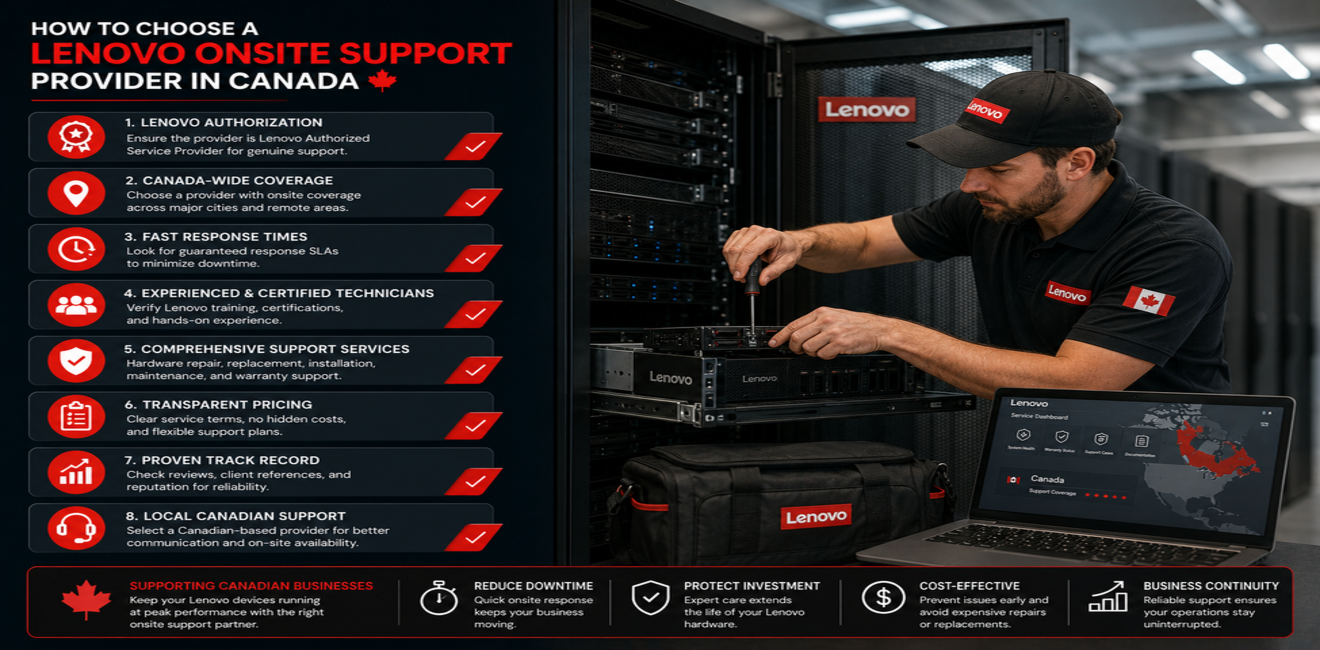
A failed hard drive doesn’t wait for a convenient time. Neither does a dead server fan, a cracked laptop screen before a client meeting, or a workstation that won’t boot the morning of a deadline. When your business runs on Lenovo hardware, the equipment is only half the equation — who shows up when it breaks is the other half.
That’s really what onsite support comes down to: not a line item in a warranty brochure, but the difference between a same-day fix and a two-day work stoppage. Whether you’re running a single office or coordinating IT across multiple locations, the provider you choose determines how much of that downtime you actually feel.
What Is Lenovo Onsite Support?
Instead of boxing up a laptop and shipping it off to a depot for a week, onsite support sends a certified technician to you. Most eligible hardware problems get diagnosed and repaired on the spot, at your desk or server room, rather than in a queue somewhere else.
Lenovo offers a few tiers of this, and the names matter more than they might seem to at first glance. Premium Care Onsite Support and Premier Onsite Support cover the basics; Premier Support with Onsite NBD (Next Business Day) adds a next-business-day guarantee, which is the tier most businesses actually need if downtime has a real dollar cost attached to it.
Why Businesses Choose Onsite Lenovo Support
There’s an obvious reason and a less obvious one.
The obvious one: speed. Shipping a laptop to a repair depot can mean a week or more without it. A technician walking through your door the next business day turns that into hours, and every hour a server or workstation is down usually has a real cost attached — lost productivity at minimum, missed deadlines at worst.
The less obvious one: it takes the problem off your team’s plate entirely. Nobody on your staff has to box up hardware, track a shipment, manage a loaner, or spend an afternoon on the phone reading error codes off a screen. A certified technician arrives already knowing Lenovo hardware, diagnoses the actual issue instead of guessing, and repairs it using approved parts and procedures — so it stays fixed instead of becoming a recurring ticket.
What to Look for in a Lenovo Onsite Support Provider
Price shouldn’t be the first filter — it should be closer to the last one. A few things matter more:
Actual Lenovo-specific expertise, not general computer repair experience. Enterprise Lenovo hardware — ThinkPads, Think Stations, Think System servers — has its own quirks, parts, and diagnostic procedures. A technician who mostly works on consumer laptops will take longer to find the same problem.
A response-time commitment you can hold them to. “We’ll try to get someone out soon” isn’t a service level — it’s a guess. If your systems can’t tolerate multi-day downtime, ask specifically about Premier Support with Onsite NBD and what “next business day” actually means in your region — some providers’ NBD coverage only extends to major metro areas.
Real experience with business IT, not just hardware. A provider who understands how your servers, network, and cloud setup fit together will spot a problem that’s actually a network issue instead of replacing a part that was never broken.
Room to grow with you. The provider that fixes today’s broken laptop should also be able to handle tomorrow’s office move, next year’s server migration, or a shift to managed IT services — so you’re not re-vetting vendors every time your needs change.
Why BridgeCam Is a Trusted IT Partner
BridgeCam Technology Inc. works with Canadian businesses that would rather call one team than juggle five vendors when something breaks.
That team handles:
- Lenovo onsite support
- Hardware deployment and replacement
- IT helpdesk services
- Network support
- Cloud platform support
- Data center services
- Infrastructure maintenance
The advantage isn’t just convenience — it’s that whoever shows up to fix your Lenovo server already understands how it connects to your network, your cloud environment, and everything else BridgeCam manages for you. Fewer handoffs, fewer “that’s not my department” conversations, less time re-explaining your setup to someone new.
When Should You Request Lenovo Onsite Support?
Some of these are obvious emergencies. Others are easy to put off until they become one. Onsite support is worth calling in for:
- Hardware failures
- Server issues
- Laptop or desktop repairs
- Device deployment projects
- Office relocations
- Infrastructure upgrades
- Business-critical equipment problems
The deployment and relocation items on that list surprise people — onsite support isn’t just for emergencies. Rolling out fifty new laptops or moving a server room to a new office are exactly the kind of projects where having certified technicians on-site, rather than coordinating it all remotely, saves real time.
Conclusion
Hardware is going to fail eventually. That’s not a knock on Lenovo — it’s just what happens to machines that run eight, ten, twelve hours a day. The real question is how long it takes to get back up once it does, and that comes down entirely to who you’ve got on call.
BridgeCam provides Lenovo onsite support alongside infrastructure help and managed IT services for Canadian businesses that would rather solve that problem once than think about it every time something breaks.
Frequently Asked Questions
What is Lenovo onsite support?
A technician comes to you instead of your hardware going to them. For eligible Lenovo devices, that usually means a same-visit diagnosis and repair rather than a week-long round trip to a depot.
What is Lenovo Premier Support with Onsite NBD?
It’s Lenovo’s higher tier of coverage: priority phone and remote support first, and if that doesn’t resolve the issue, a technician on-site by the next business day. It’s the option most businesses mean when they say they can’t afford downtime.
Is Lenovo Premium Care Onsite Support suitable for businesses?
For a small office with a handful of laptops, sure. Once you’re managing servers or a larger device fleet, most businesses outgrow it and move to Premier Support, which is built for enterprise environments rather than individual users.
Why choose BridgeCam for Lenovo onsite support?
Mainly so you’re not managing a separate vendor for every piece of your IT stack. BridgeCam handles the Lenovo hardware and the network, cloud, and infrastructure it plugs into — one team that already has context on your setup, instead of one more company you have to bring up to speed.