
Installing the equipment is the easy part. The hard part — the part that decides whether your facility runs for a decade without an unplanned outage or takes its first hit during the first heatwave — happens in the weeks after the last rack is bolted down and before the first production workload lands.
That gap is what commissioning fills. A commissioning checklist forces every system in the building to prove it works: not on paper, not in the vendor’s spec sheet, but under load, under fault conditions, and alongside every other system it depends on. Skip it, and you find your problems in production, at 2 a.m., when they’re expensive and public. Do it properly, and you find them while the contractor is still on site and the fix is a line item, not an incident report.
Below is a checklist built around how commissioning actually plays out on Canadian projects — including a few things that are genuinely different north of the border.
What Data Center Commissioning Actually Is
Commissioning is the structured process of testing and validating every critical system before a facility goes operational. Power, cooling, network, servers, physical security — each one gets verified on its own, and then the whole plant gets tested as a single interdependent system.
The point isn’t just to confirm that things turn on. It’s to prove they behave correctly when something goes wrong. A UPS that carries the load on a sunny afternoon isn’t interesting. A UPS that carries the load the instant you drop utility power, holds it until the generator picks up, and does so without dropping a single server — that’s the thing commissioning is designed to catch or expose.
Why This Matters More Than It Looks
If you’re building new, expanding, or retrofitting, the argument for commissioning comes down to a few hard realities.
Failures hide until they’re triggered. A mis-labelled breaker, a redundant power path that was quietly wired single-corded, a cooling loop that’s fine at 40% load and chokes at 90% — none of these show up during a walkthrough. They show up under stress, which is exactly the condition commissioning creates on purpose.
Downtime in Canada isn’t just an IT problem. For regulated sectors — financial services under OSFI expectations, health data under provincial privacy law, public-sector workloads — an outage can trigger reporting obligations and audits, not just a bad afternoon. Proving your infrastructure was validated before launch is part of defensible operations.
The investment is supposed to last. A facility that’s commissioned properly starts life with a clean baseline: documented, tested, and understood. That baseline is what every future upgrade, capacity add, and maintenance window gets measured against.
The Commissioning Checklist
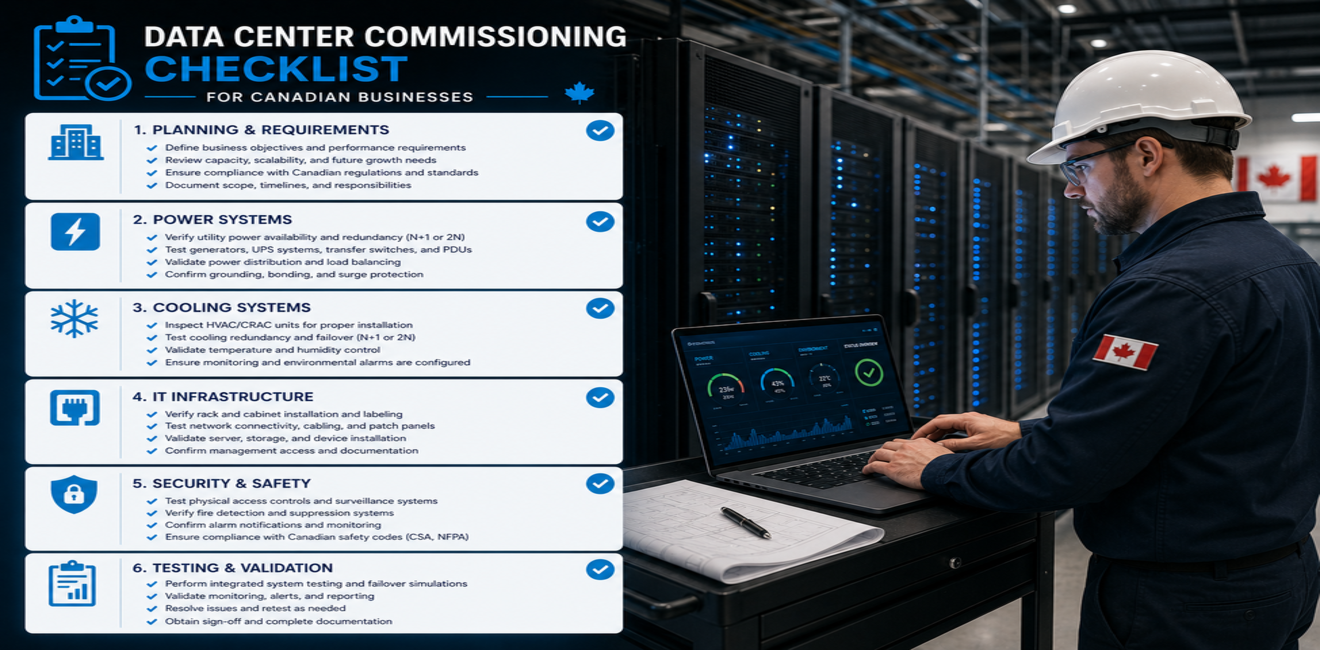
No two projects are identical, but a thorough process moves through these stages in roughly this order.
1. Review the Design Against What Got Built
Start by comparing the as-built installation to the approved engineering drawings. This sounds procedural, and it is — but it’s where the cheapest catches happen. Wrong PDU model, redundancy that got value-engineered out during construction, a cooling capacity that no longer matches the projected IT load. Catch it here and it’s a redline. Catch it later and it’s a change order.
2. Prove Out the Electrical System
Electrical is where most serious commissioning effort goes, and where Canadian projects carry their own requirements. Everything is installed and inspected to the Canadian Electrical Code (CSA C22.1), with provincial amendments and inspection regimes that differ between, say, Ontario (ESA) and B.C. or Alberta — so build the inspection sign-offs into your timeline rather than assuming a single national process.
Test the full chain:
- Utility feed and service entrance
- UPS systems, including a real transfer test — not just a battery self-check
- Backup generators, run under actual load, not idling
- Power distribution units and branch circuits
- Redundant power paths, verified by actually failing one path and confirming the load rides through
One cold-climate note worth planning for: standby generators in much of Canada need block heaters, cold-weather fuel treatment, and load banks that can validate performance at low ambient temperatures. A generator that starts fine in a September commissioning test isn’t automatically the generator you want in a −30 °C January. Where possible, test with that in mind.
3. Test Cooling — and Take Advantage of the Climate
Confirm the cooling plant holds target temperatures across the space, including at peak load and with a unit or two deliberately offline to simulate a failure. Reference the ASHRAE TC 9.9 thermal envelopes as your acceptance targets rather than picking a number out of the air.
Here’s where Canada is genuinely different: for most of the country, the outside air is cold enough, often enough, that free cooling (air-side or water-side economization) does real work for a large share of the year. If your design includes economizers, commissioning is where you validate the changeover logic — that the system actually shifts to free cooling when conditions allow, hands back to mechanical cooling smoothly when they don’t, and doesn’t oscillate at the boundary. That capability is a big part of why Canadian facilities can run low PUE numbers, but only if the controls sequence was tuned and proven, not just installed.
4. Validate the Network
Inspect and test switches, routers, firewalls, structured cabling, upstream connectivity, and — critically — redundancy. Pull a link, pull a switch, and confirm traffic reconverges the way the design promised. Verify diverse carrier paths are actually diverse and not sharing a single conduit into the building, which is a surprisingly common and surprisingly ugly discovery.
5. Verify Server and Rack Deployment
Confirm servers are installed, cabled, firmware-leveled, and configured to spec, and that they draw and perform within expected parameters. This is also the moment to sanity-check that rack power and cooling assumptions from the design survived contact with reality.
6. Confirm Physical Security and Environmental Monitoring
Test access control, CCTV coverage and retention, environmental sensors, fire detection and suppression, and alarm routing. Confirm that an alarm doesn’t just light a panel in an empty room — that it reaches the people who are supposed to act on it, through the channel they’ll actually see.
7. Test Backup and Disaster Recovery
Don’t just confirm backups run. Restore something. A backup you’ve never restored is a hypothesis, not a safety net. Validate that recovery procedures return real data within the recovery-time objectives the business actually committed to.
8. Run Integrated Systems Testing
This is the phase everything else exists to support. With all systems live, you simulate failures — drop utility power, fail a cooling unit, kill a network path — and watch how the whole plant responds as one organism. Individually passing systems can still fail together: the classic example is a generator that starts perfectly but can’t carry the cooling load and the IT load and the inrush all at once. Integrated testing is the only stage that surfaces that class of problem before customers do.
The Commissioning Levels, Briefly
Larger projects formalize the work into staged levels. You’ll see them written various ways, but they generally map to:
- Factory testing — equipment proven at the manufacturer before it ships.
- Installation verification — confirming it was installed and wired correctly on arrival.
- Functional performance testing — each system exercised on its own under normal conditions.
- Integrated systems testing — the whole facility tested together, including simulated failures.
How many levels you run, and how deep, scales with facility size, uptime requirements, and whether you’re targeting a formal standard like an Uptime Institute Tier certification.
Why the Right Team Makes the Difference
Commissioning sits at the intersection of electrical, mechanical, network, compute, and security — and the failures worth catching almost always live in the seams between those disciplines. A team that only knows electrical will pass a UPS test and miss that it can’t sustain the cooling load. A team that only knows IT won’t push the generator hard enough to expose it.
Experienced commissioning specialists earn their keep by finding the problems that don’t belong to any single trade: the interactions, the assumptions that didn’t survive construction, and the failure modes nobody thought to test. They also produce the documentation trail that regulators, auditors, and your own future operations team will lean on for years.
Why Businesses Work With BridgeCam
BridgeCam Technology Inc. provides data center commissioning, infrastructure validation, hardware deployment, network implementation, and ongoing support for organizations across Canada.
We work alongside your team to stress-test the systems that matter, verify performance under real and simulated conditions, and hand back a facility you can trust from the first production workload. Whether it’s a new build, an expansion, or a retrofit of aging infrastructure, our focus is the same: prove it works before it has to.
The Bottom Line
Commissioning is the difference between a data center that was installed and one that’s actually ready. A disciplined checklist turns “it should work” into “we tested it, and here’s the record.” For Canadian businesses, that means fewer outages, a cleaner regulatory posture, cooling that quietly exploits the climate instead of fighting it, and infrastructure that holds its value long after launch day.
Frequently Asked Questions
How long does data center commissioning take?
It depends on facility size and how many levels you run, but expect anywhere from a couple of weeks for a small deployment to a few months for a large build with full integrated systems testing. The electrical and integrated-testing phases usually drive the timeline — and in Canada, provincial electrical inspection scheduling can add lead time worth planning around.
Is commissioning the same as a standard equipment inspection?
No. An inspection confirms things are installed correctly. Commissioning goes further — it proves systems perform under load and fault conditions, individually and together. Inspection tells you it’s wired right; commissioning tells you it’ll survive losing utility power in January.
Do we still need commissioning if we’re only expanding an existing facility?
Yes, and arguably more carefully. Expansions have to prove they integrate with live infrastructure without destabilizing what’s already running — which makes the integrated testing phase especially important.
Are there Canada-specific standards involved?
Electrical work follows the Canadian Electrical Code (CSA C22.1) with provincial amendments and inspection authorities that vary by province. Cooling acceptance criteria typically reference ASHRAE thermal guidelines, and facilities pursuing formal uptime targets often align with Uptime Institute Tier standards.
Does every business need commissioning?
Any organization building, expanding, or retrofitting critical infrastructure benefits from it. The larger the reliability and compliance stakes, the harder it is to justify skipping it.